Since 25.08 It will not be possible to log in to Millenet from the version of the browser you are now using. Update the browser on your device and use online banking in a comfortable and secure way.
Update the browser
Cashback up to 25%
Check out the Cashback programme in your app
Buy and benefit

The Cashback programme is available in our mobile app. Use it when shopping at your favorite online and stationary stores, and get part of your spending back.
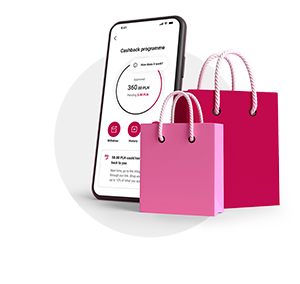
- Get up to 25% cashback
- Available at hundreds of stores
- Access exclusive offers for Bank Millennium customers with Millennium 360° and Millennium 360 Prestige accounts
- Track your cashback in the mobile app
See how it works
-

Choose an offer
For online offers: go to the store’s website using the Go to store button. For stationary offers: activate the offer, then visit the store and shop. You don’t need to show the offer to the cashier.
-
Shop as usual
Pay with your Bank Millennium card or BLIK via our app. The cashback amount will appear in your pending funds within 3 business days.
-
Get your cashback
Once the store confirms your purchase, your cashback moves from pending to approved funds. This usually takes about 30 days.
-

Withdraw
Collect at least 21 PLN and withdraw it to your account.
You can get cashback at these stores







What’s the status of your cashback?
In the app, you’ll find the status of your transactions. We’ve divided them into three groups:
-
Pending. On average, you’ll see your transaction here within 3 days of purchase. Your cashback will remain here until it’s confirmed by us and the store. This usually takes about 30 days.
-
Approved. Here you’ll find transactions that have been successfully verified. Collect at least 21 PLN and withdraw.
-
Rejected. Transactions that weren’t approved end up here, for example, if you return the product.
Do you love great deals?
Check out our Superoffers - higher-than-usual cashback rates at popular online and stationary stores.


We increase cashback amounts up to several times higher

Available for a few or several days

With Millennium 360° or Millennium 360 Prestige account, you can enjoy the best Superoffers
Stay up to date and check current offers in our app!
Gain more with Millennium 360° and Millennium 360 Prestige accounts

- 0 PLN for account maintenance
- Higher cashback on shopping
- Special offers - we'll present you the list of offers that may perfectly suits your needs

If you don't have the account in Bank Millennium, you can convenintly open it online without having to leave home in even 15 minutes.
If you have Konto 360° or Konto 360° Student and you want to convert it to new Millennium 360° account, you can do it in any branch.
FAQ
Shopping and cashback
- What is the Cashback programme?
-
"Cashback" is a loyalty programme of Bank Millennium, which allows you to get a refund of part of the money spent on purchases in online shops and traditional partners. The condition is to pay for purchases using the payment method specified in the offer, most often by card or BLIK from Bank Millennium. About 600 popular brands (partners) take part in the programme, including eobuwie.pl, Empik, Media Markt, Media Expert and many others.
- How does the Cashback programme at Bank Millennium work?
-
All you have to do is activate the offer you are interested in via our mobile application and make a purchase in the partner's traditional or online shop. Pay attention to the validity period of the offer and the condition regarding the payment method included in its description - most often a card or BLIK from Bank Millennium. To get a refund for online purchases, you need to go to the shop from our app. You will receive a refund of part of the purchase amount to a special account in the programme, from which you can withdraw the approved funds after collecting min. PLN 21.
Shopping rules
- Why do I get cashback?
-
Shops that participate in the programme gain more customers. Therefore, they are willing to pay a commission for each additional transaction. The refund you get comes from this commission.
- What do transaction statuses mean?
-
"Pending" - the transaction is waiting for confirmation by the shop.
"Approved" - the transaction has been confirmed by the shop.
"Declined" - the transaction was rejected because the purchase did not meet the conditions for granting Cashback by the shop.
- Are the shop's offers in the Cashback programme the same as for purchases without a refund?
-
Yes – the price offer in the shop is the same regardless of whether you make a purchase under the programme or not. In the case of online shopping, you always end up on exactly the same shop website as a customer who does not use the programme. In a brick-and-mortar shop, you make payments as always – you don't have to inform the seller about using the Cashback programme.
- Can I combine Cashback with discount codes?
-
In the details of each offer, you will find information about whether you can combine a purchase under the Cashback programme with the use of a discount code.
- For what reason can my Cashback not be applied?
-
No refund will be applied if you did not activate the offer before purchase or if you did not meet the conditions of the offer presented in the description of its details in the mobile app, e.g.:
- you paid with an unauthorised payment method, e.g. a card issued by another bank or a prepaid or gift card,
- you used a gift card or prepaid card,
- you have not approved the marketing consent and cookies on the shop's website,
- in your phone's settings, you have not consented to tracking your activity while shopping on your phone mobile app.
Note! Some shops do not apply cashback for orders made through the mobile app, so it is important to always check if the shop in question allows in-app purchases.
Problems and concerns
- Where to find the Allegro order number?
-
You can find the order number on Allegro in the purchase details. In the purchase confirmation email, click: Go to purchase details or in the shop app: Purchase details, then: Expand purchase details.
- Why am I waiting so long for a refund in TEMU, Amazon and Shein?
-
In brands such as Temu, Shein, Aliexpress or Amazon, the average transaction verification time is about 120 days. This is the time necessary for the shop to settle transactions with its suppliers, confirm receipt of goods and accept possible returns. In each offer you will find information about the average time of acceptance of transactions in this shop.
- Why is the cashback amount different than I expected?
-
Cashback values are determined by the net or gross purchase price. In the case of purchases in traditional shops, the basis for applying the refund is the entire amount of the payment made, e.g. by debit card. For online shop purchases, refunds are usually applied on the net value of the order, excluding shipping costs. Such a shop has Customer segments or commission groups that differentiate the amount of Cashback.
- Why is my transaction still pending?
-
The transaction has this status because the shop has not yet verified the transaction in terms of meeting the conditions for granting a refund. The waiting time for the approval of cashback depends on the brand and the time that the shop gives to return the purchased goods.
- Where to check how long I have to wait for cashback?
-
Each offer has a "When will you get your refund?" section, where we provide information about the average time for the shop to verify the transaction.
- Why can't I see my transaction in Cashback?
-
Make sure that the offer was activated before the purchase was made, and that the payment for that purchase is recorded in your bank's payment history. If both steps are saved correctly, write to us using the correct option in the mobile application. We will verify your request.
- How can I pay-out the cashback?
-
After collecting at least PLN 21 in your account in the programme (in approved funds), you can order a transfer. All you have to do is select the "Withdraw" option and the amount will be paid by instant transfer to your current account with Bank Millennium.
- What are approved funds and pending funds?
-
Your cashback balance is made up of approved funds and pending funds. Approved funds are refunds that have already been verified and confirmed by the shops where the transactions were made. Pending funds are refunds that are awaiting verification by the shops where the transactions were made.
- How do I know if an offer is available online or in a traditional shop?
-
Each offer has information about the location. If you see "Online" on your offer, it means that you can only use the offer for online purchases. If you see “Traditional" on your offer, it means that you can only use the offer for purchases made in a brick-and-mortar shop.
- How to get cashback for purchases in an online shop?
-
Select a shop from the list and go to it through our link. This step is very important, because thanks to this we are able to identify purchases for which we will later pay cashback. Make your purchase online as usual and pay with our debit or credit card or by BLIK from our app.
- How to get cashback for purchases in a traditional shop?
-
Select a shop from the list and activate the offer. Make a purchase at the brick-and-mortar shop of your choice as usual. Pay during the offer validity period with our debit card, credit card or BLIK from our app.
- What does it mean that cashback is, for example, up to 12%?
-
This means that a given shop has designated commission groups. To find out the details, go to the offer you are interested in and click on "Check the amount of cashback". There you will find information about the cashback rates offered by the shop. In addition, pay attention to whether the shop does not have a specific maximum cashback value.
- What does it mean that the offer is valid until the promotional pool is exhausted?
-
When an offer is very popular, there is a possibility that the cashback pool that the shop has allocated to a given offer may be exhausted earlier than the planned end date of the promotion. Therefore, do not wait and take advantage of the offer you are interested in right away!
- How many times can I use the offer?
-
Most offers are one-time use. However, if the offer has an individual usage limit, you will see this information in the offer details. Remember that you only need to activate this offer once, before using it for the first time.
- I activated the offer, but I didn't have time to use it. What now?
-
If the offer expires, it is no longer possible to use it - regardless of whether the offer was activated or not.
- Why are some offers marked as super-offers?
-
These are special offers with a higher cashback available for purchases from a partner, they usually have a shorter expiration date. In addition, they can be used on the same terms as standard offers.
- Why can't I see my transaction?
-
It usually only takes a few minutes to register a transaction, which you can then see in your profile. However, sometimes this process can take longer, which is why the deadline for registering a transaction is up to 3 business days. Before you report a missing transaction, make sure that 3 days have passed since you made the purchase and that your transaction hasn't just been added to the list.
Important documents
- ???link.opens.in.new.window??? Regulations for goodie.pl platform users - in Polish (valid 9.06.2025-26.11.2025)
- ???link.opens.in.new.window??? „Bonus na start do usługi Zwroty za zakupy – konto Millennium 360 Prestige” promotion regulations - in Polish
- ???link.opens.in.new.window??? „Zyskaj dodatkowe 20 zł” (17.02.2025 - 09.03.2025) promotion regulations – in Polish
- ???link.opens.in.new.window??? „20+20” (12.05.2025 - 08.06.2025) – promotion regulations – in Polish
- ???link.opens.in.new.window??? „Zyskaj dodatkowe 20 zł” (18.08.2025 - 14.09.2025) – promotion regulations – in Polish
- ???link.opens.in.new.window??? "Bonus na start 15+20 w usłudze Zwroty za zakupy" promotion regulations - in Polish (1.09.2025 – 25.11.2025)
- ???link.opens.in.new.window??? „Zyskaj dodatkowe 30 zł w Zwrotach za zakupy” – promotion regulations in Polish
- ???link.opens.in.new.window??? "Zwroty za Zakupy" programme regulations (in Polish)
- ???link.opens.in.new.window??? „Bonus na start 15+20 w programie Zwroty za zakupy” promotion regulations (27.11.2025 – 31.03.2026) - in Polish
- ???link.opens.in.new.window??? "Zrób zakupy i zyskaj 20 zł" promotion regulations (3.03.2026 – 29.03.2026) - in Polish
- ???link.opens.in.new.window??? „Bonus na start 10+15 w programie Zwroty za zakupy” promotion regulations (1.04.2026-30.06.2026) - in Polish
- ???link.opens.in.new.window??? „Zyskuj z Biedronką” promotion regulations - in Polish (PDF)